Showing posts with label more. Show all posts

Wednesday, June 27, 2012

Facebook App Center- Central place to find all Apps

As we all now,Facebook keeps rolling out new features these days to keep user interest in the Social Networking site, and as we all know the innovative features have become a regular feature just after Google launched Google+ .

On June 8th, Facebook launched the App Center rather quietly, a central place to find all apps. You click on the app and find a detailed description of each of the applications, You can see which of the apps are being most played by your friends. You also have Top Rated, Trending and Top Grossing categories of the apps.The overall UI is quite clean and looks spectacular.

The App Center is also compatible with mobile devices like iOS, Android and if an app requires installation it is downloaded through the App Store or the Google Play.

Visit the App Center here

Thursday, June 21, 2012

Remove Ads from Android Apps


Free Android Apps are generally screen spammed with advertisements which many users find it annoying. Almost 80% of the free app market are filled with bunchload of annoying ads. There is a simple method to Block and remove ads from Android apps. The only requirement for this tutorial is a rooted Android device. This method doesn’t work with non-rooted devices.

  • AdAway is a tailor-fit app to block ads from Android Apps. 
  • You can Download and Install AdAway here 
  • After having the above app installed, Open it. If you are running it for the first time.
  •  It prompts to download some external files and enable ad blocking, Click OK It automatically downloads the required files and tweaks your Android Device to block the ads. 
  • After the download process is completed, Restart your Android Device and have fun with Ad-Free App.

Saturday, June 9, 2012

Episode Player Remembers What Episode Of A TV Show You Watched Last


Got numerous TV shows lined up on your PC and don’t know which one to start first? Forgot the last episode you watched of Game of Thrones? Well, Episode Player is here to help. This application keeps track of all your favorite downloaded shows and lets you know what was the last episode you were watching. Whether you like Dexter or Spartacus, House M.D or Lost, it will keep every show in order, so that you can easily check whether you have missed an episode or not. It automatically recognizes all the available media players on your computer and provides their shortcuts, allowing you to play the episode in your favorite media player. Not only does it automatically detect all built-in applications such as Windows Media Player, Windows Media Center etc., it also adds third-party players such as KMPlayer, VLC and MPC. Details to follow after the jump. When you launch the application, add the source directory of your TV shows. Click Open Folder at the bottom left and select the source directory. You will see that all the available episodes are listed in the left panel. Furthermore, the application will scan your PC for installed media players and place their shortcuts in the right sidebar. To begin, select the episode, followed by your preferred media player and click Play to start watching it. The application will let you know which episode you’ve already watched with a check mark.
Despite being an awesome episode tracker, the application does have a few hiccups. For instance, it would have been better if it allowed users to easily select already added folders instead of manually selecting them each time they want to switch to a different show. It works on Windows XP, Windows Vista, Windows 7 and Windows 8. Both 32-bit and 64-bit OS editions are supported.

Download Episode Player

Thursday, March 8, 2012

Robin for Android:Personal Voice Assistant on the Road


There are many Voice Assistants available in the Android market which can capable to do any job on your voice command. Meet the new Voice Assistant called ‘Robin’. Robin for Android allow users to ask directions, traffic information, real-time parking data. Actually the Robin is the personal voice assistant on the Road which help you find road or parking space while you’re driving. Simply you’ve to tap the microphone button to ask the question, even when in the background, you can activate the Robin by just “wave hello” twice in front and above the screen.The bad things is that the app will work in US only.
Parking
• Where can I park?
• Find cheapest parking around Union Square
• I need parking near Columbus at Montgomery
• Next one
• Anything closer/cheaper?
• What else do you have?
• Let’s go there!
Navigation
• Go to 1234 Lombard San Francisco
• Navigate to nearest Starbucks
• Get me to Getty Museum
• Directions to Hollywood and Highland
Traffic
• How is the traffic?
• What is the traffic like in San Francisco?
Misc
• What can you do?
• What time is it?
• Tell me a joke

Monday, August 22, 2011

Ubuntu 11.10 Oneric Ocelot Alpha 3 Quick Review


Ubuntu 11.10 Oneric Ocelot Alpha 3 was released few weeks ago. I decided to properly install Ubuntu 11.10 Oneric in my notebook along with Ping-Eee OS this time around instead of just experimenting it with a USB install. I have been using Ubuntu 11.10 Alpha 3 as my primary OS for almost 2 weeks now and this is how I feel about it. Read on.

Ubuntu 11.10 Oneric Ocelot Alpha 3 Review
With the release of latest Alpha 3 version, Ubuntu 11.10 is a hugely transformed distro now.  Ubuntu 11.10 Alpha 3 comes with Linux Kernel 3.0.0-7, Nautilus 3.1.4, Ubuntu Software Center 4.1.11, Banshee 2.1.0, Thunderbird 6.0, Firefox 6 from Mozilla beta channel, Unity 4.6.0 and GNOME Shell 3.1.3(it's in the repositories, not installed as default).


Saturday, June 18, 2011

MetroTwit-A sleek Twitter Client for Windows based on Metro UI


Twitter is the best platform to keep you updated with latest events and trending topics. Twitter allow us to share our feelings in 140 characters and many twitter addict like me rely more on desktop clients rather than Twitter Web. Desktop client gives you ease to manage the timeline, mentions and DM in convenient way. There are plenty of Twitter clients out there for your desktop and mostly all based on Adobe Air like TweetDeck, Seesmic etc. Today I found the light weighted efficient Twitter client for my Windows i.e. MetroTwit.

MetroTwit is based on latest Microsoft .NET 4.0 and Windows Presentation Foundation 4 frameworks. It is a first-class native application that shines on Windows. It is inspired from Microsoft Metro design and optimized for Windows 7.The interface itself is clean, elegant and functional. MetroTwit having all the features one would expect from an All in on Twitter client. Since it is not based on Adobe AIR platform, I found the functionality is very smooth.
With resizable and reorderable columns you can manage your timeline, send direct messages, reply to your followers, view current trends, categorize favorite tweets and retweets and many more.
MetroTwit need Microsoft .NET 4.0 framework components to work. When you kick-start the installation it will download the necessary .NET framework component and then install application in your pc. After installing the application, click Sign in to begin the authorization. Enter the verification code from the browser during Oath process. By default it show three columns containing your timeline, mentions and direct messages. Tweetbox is present below these columns with “Add Columns”, “Twitter List” and “Refresh” button in left side of the tweet box and “Search Twitter”, “User profiles” and “Twitter Trends” button at the right side of the tweet box.

Friday, April 8, 2011

How to Watch TV Online Using VLC Media Player

Source:CallingAllGeeks
VLC media player is one of the most famous open source media players. Did you know that you can use VLC media player as a television and watch tv channels on it? In this post I will show you how you can do that with an easy tutorial. So, lets begin.
1. Open up VLC Media Player. Don’t have it installed? Download VLC player from here –> Link.
vlc How to Watch TV Online Using VLC Media Player

Tuesday, March 8, 2011

Unusual Google Links on Google

Although Google is a search engine, it’s also a website. It has millions of it’s own pages indexed in it. Enjoy!
1. If you ever wondered all the misspellings of Britney Spears and their volume, you must check this out.
http://www.google.com/jobs/britney.html
2. These two links are to fun Google games
http://www.google.com/Easter/feature_easter.html
http://www.google.com/heart/heart01.html
3. Quench your thirst for knowledge with Google Gulp
www.google.com/googlegulp
4. Check out Google’s latest ideas
http://www.google.com/experimental
5. If you are fond of puzzles
http://www.google.com/puzzles
6. Tribute to Moms
http://www.google.com/moms01
7. Google Mobile maps
http://www.google.com/mobile/gmm/index.html
8. http://www.google.com/tofc
9. Are you scary smart?
http://www.google.com/scarysmart
10. Google press center
http://www.google.com/press
11. Google apps
http://www.google.com/a/help/intl/en/var_0.html
12. Mind-racing problems
http://www.google.com/indiacodejam
13. Doodle 4 Google
http://www.google.com/doodle4google
14. The virgle
http://www.google.com/virgle
15. Google Alerts
http://www.google.com/alerts
16. Urchin Software from Google
http://www.google.com/urchin
17. Google dictionary
http://www.google.com/translate_dict
18. Inside google
http://www.google.com/plex
19. Movie reviews
http://www.google.com/reviews
20. Google Mars
htttp://www.google.com/mars
21. Google Sky
http://www.google.com/sky
22. Google’s next Coding Competition site
http://www.google.com/codejam
23.http://www.google.com/pda
24.http://www.google.com/m
25.http://www.google.com/imode
26.http://www.google.com/jsky
27. Blog search
http://www.google.com/blogsearch
28.Microsoft on google
http://www.google.com/microsoft
29. Google Moon
http://www.google.com/moon
30. Google Linux
http://www.google.com/linux
31. http://www.google.com/ie
32. Google tour
http://www.google.com/tour/services
33. Google TOS
http://www.google.com/accounts/TOS
34. Google trends
http://www.google.com/trends/hottrends
35. Google arts
http://www.google.com/Top/Arts
36. Google 3d warehouse
http://www.google.com/sketchup/3dwh
37. Google Adult content
http://www.google.com/Top/Adult
38. Google & Dilbert Doodle
http://www.google.com/dilbert.html
39. Google in Kannada
www.google.com/intl/kn
40. Google strange logos
http://www.google.com/doodle8.html
http://www.google.com/doodle9.html
30.Win Registry files in google
http://www.google.com/google_rsearch.reg
31.Google Universities Search
http://www.google.com/options/universities.html

Friday, February 4, 2011

Internet Error Codes and Meaning


Sometime you are browsing the internet and trying to open any website, your e-mail and any FTP sites , but you see different error codes there. You should be familiar with these error codes. You can solve these problems if you are well-known with the meaning of error codes.


  • 400  -This is bad request error, First check you may be typing wrong URL name and server could not understand your request.
  • 401     You are trying to open any unauthorized access site or page. Check your username and password if you are trying to open any webpage.
  • 402     Payment Required Error
  • 403     You are trying to open any forbidden page and you are blocked by that domain.
  • 404     Here you are trying to open the webpage that was removed or re-named, also check the URL spelling.
  • 408     This is time out error. you should send the request with in time that the server set for you.

Monday, January 3, 2011

Some Interesting domains...(Com.com,etc....)

I was just getting bored and wondered what happens when I type com.com into the browser wondering who owns the interesting domain name right now and I am telling you I was really amazed. Voila! cnet.com appeared!
So it was clear that  cnet owned the domain name because the URL was redirected to cnet.com. Now I have started to feel that CNET has gone out and grabbed some of the most interesting domains out there on the web. Guess what happens when you click this: News.com and download.com

Oh, and after I did that, I also tried the domain Net.net and I was surprised even more!

Friday, December 31, 2010

Use Opera Portable to access blocked websites from anywhere

The Opera browser is a browser with very unique features. When you turn on the Turbo mode, like on mobile devices, the browser sends the request to Opera's high performance servers, which then act as a middle person to transfer the website to you. In the process, the servers compress the data, so that it downloads very fast on your computer. Though it causes the images on the page to be of lower quality, it does the work super-fast if you happen to be using a very slow Internet connection.

You can also use this feature to your advantage when going to school or work.

On school and many workplace networks, many websites (that may make you unproductive) like Facebook, YouTube etc. are blocked by the administrators. When your browser sends a request to connect to any of the blocked website servers, the network blocks you.


Opera Turbo on
But if you use Opera Portable on a flash drive (so that you can carry it around), run it on a computer at your workplace and then turn on Opera Turbo, your browser will send the request to the Opera servers, which will act as anonymous proxies for you. The network will not be blocking the Opera servers from communicating with you, and you will be able to browse the websites safely.

Network admins usually block out major anonymous web proxies, which are usually free services that download sites for you. But it will hardly ever be a case that an institution is blocking Opera servers. Plus, unlike other web proxies, Opera will let you download compressed websites, giving you much better performance too.

Download Opera Portable Edition now.

Thursday, December 30, 2010

Reasons why Windows Phone 7 can beat Android

Windows Phone 7 or Win 7 is the latest operating system  introduced by Microsoft in the market, though no phone operating on it has been launched in India but the wait is worth it.
Though Windows have already made a big fault by releasing it so late because Android has taken a strong grip in Mobile phone market, it would be quite a challenge for Microsoft to get its loyal smartphone users back.
Sure Android is a good OS but there certain features in the new Windows Phone 7 that might compel potential smartphone buyers to get a move on from android and try something else.
Here are five reason why Windows phone 7 can compete with Android OS…
Windows Phone 7 


1. Tiles Layout
Interesting but very practically designed, the new Windows Phone 7 OS has no icons in its layout like Android but offers Tiles. So how are they different? Well they could save you a lot of time and generate updates without opening the application.
All your favorite social network updates, news updates, score updates and much would be displayed directly on the homescreen with this feature, therefore it will save you a lot of time and make things more organized.

2. Hubs Features

hubs on windows phone 7Do you like carrying your community and friends with you? and share a lot of things besides just small sized documents with them then please don’t use free file hosts anymore because Windows Phone 7 offers Hubs features which lets you carry your community with you and allows sharing of multiple files or various formats with them.
So you can create several hubs like Office hub, friends hub etc. and share without limits.
apps on windows phone 7

3. Lots of Apps, Dedicated Apps Store

Though this is not something you might have not really heard in these months since the most popular apps store is of Apple followed by Android but hang on! Microsoft has decided to offer its app store not in primitive stage but in a completely develop stage which means there are not just a few but several hundred apps which might take you upto 6 months to use and test.
A lot of free games are also included that supporting Xbox Live Integration.

4. Hell lot of Xbox Games

Did you get pretty excited after reading Games word in the last sentence and its Xbox Live Integration the don’t get surprise, i could not believe it when i heard it first either but this seems to be true.
Windows Phone 7 OS has the capability and hardware to run Xbox games and also offers multiplayer support. Though the quality of games is still under doubt, but if the doubt comes out to be negative then no phone OS would stand a chance against Win Phone 7.
marketplace on windows phone 7

5. Great App world for developers

Microsoft is hiring! yes, they are planning to hire quality developers for their application, this would offer great earning and learning opportunity to thousands of application developers.
They have also provided privileges to users to add their applications and once its tested upon quality and approved, the developers can list the app on their apps marketplace and assign it desired price.

Tuesday, December 21, 2010

Download Google Talk Lab Edition with Group Chat

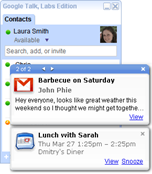
Google Talk Lab edition have released there new desktop version of Google Talk with same great features like that of the Google Talk Gadget including instant messaging, emoticons, and group chat.
image 
With this lab edition desktop notifications from Google Calendar,Orkut and Gmail are made available.But the Mac and Linux users will have have to wait for this release as it only supports windows PC for now.

The integration of Google calendar makes you to keep reminded of your upcoming appointments without opening your Google Calendar.
But if are a regular Google Talk user then please wait before installing this labs edition since it misses some important features like voice calling and file transfer.

Monday, August 9, 2010

Gmail Dot trick

What is the Gmail DOT Trick ?
See the following example

Suppose There is a Gmail account : Example@gmail.com
with password : abcd

You will get logged in to example@gmail.com If you use
email as : E.xample@gmail.com
password : abcd
email as : Ex.ample@gmail.com
password : abcd
email as : Exa.mple@gmail.com
password : abcd
email as : Exam.ple@gmail.com
password : abcd
email as : Examp.le@gmail.com
password : abcd
and so on..

That means gmail does not count periods (.)

So you can use this trick for using the same email for various GPT, PTC, Twitter accounts as they interpret all the above emails as different but gmail considers it the same.


Have fun making many accounts from your single Gmail account...

Thursday, July 29, 2010

6 of the Best Hackers of all Time

"Hackers"... the moment we hear that word a chill runs down our spine with excitement.We also want to be like them.They are someone special., some with extra knowledge and who are very intelligent. I know and am confident that everyone interested in computers has at some point of time wanted to become a hacker.
But the word 'hacker' is misunderstood by many of us.Hackers are actually intelligent computer professionals. Some people use this knowledge for the good and some people for bad purposes to bring down a system,cracking passwords. And thats how the hackers are divided: White Hat and Black Hat. White Hat are the good ones and Black Hats as you might have guessed are the opposites.
While the real experience of hacking might not be accurately represented in movies, hackers certainly do become famous for white and black hat —good and bad— deeds. The following are six of the most famous hackers of all time:
White Hat

1. Linus Torvalds
Creator of the famous Unix-based operating system, Linux, Torvalds used his hacking skills to change the fundamental programming on his home computer. This initial foray into the inner workings of a Sinclair QL inspired Torvalds to create his own system. Thanks to his efforts, the now extremely popular, open source OS was born.

2. Tim Berners-Lee
This inventor of the World Wide Web was caught hacking into Oxford files while he was a student at the university. He was then banned from the university. Eventually, he ended up working at CERN Laboratories, a European nuclear research organization. While there, he figured out a way to send hypertext through a network. At that point, the Internet as we know it was born.

3. Stephen Wozniak
While he is known known for being one of the co-founders of computer giant Apple Computer, Stephen Wozniak once made blue boxes to bypass telephone switching mechanisms. In this way, the user could get free long distance coverage. He was caught when he started selling the blue boxes to classmates.

After dropping out of college, Wozniak collaborated with his friend, Steve Jobs, to build the first Apple personal computers in their garage. The rest, as they say, is history.

Black Hat


1. Kevin Mitnick
Described by the Department of Justice as “the most wanted computer criminal in United States History,” Mitnick hacked into corporate computers, stole designs and product information, hacked the Los Angeles bus punch card system, and scrambled phones. He was eventually captured when he hacked into the computer of fellow hacker Tsutomu Shimomura. Shimomura then made it his mission to find Mitnick, and soon afterward Mitnick was in custody.

Today, he runs a computer security-consulting firm and has authored several books.

2. Robert Tappan Morris
The Morris Worm was the first such virus to be introduced to the Internet. While studying at Cornell, Morris wrote the code and released it. He claimed that he was only trying to see how large the Internet was. Unfortunately, the worm caused at least 6,000 computers to become unusable.

Three years of probation, 400 hours of community service, and $10,500.00 later, Morris had paid his debt to society. He now works as a tenured MIT professor.

3. Jonathan James
At 16 years of age, James was the youngest hacker to ever be sent to prison. The mot notable of his offenses was a back door he installed in a Defense Threat Reduction Agency server. This backdoor allowed him to access some e-mail correspondence as well as to isolate the usernames and passwords of key government employees. He also hacked into NASA’s computer system and stole technological information worth $1.7 million. To remove the inserted code, NASA had to shut down their computers. This cost them $41,000.00

James was sentenced to six months of house arrest, but was sent to prison for six months when he violated parole.

Sunday, July 25, 2010

Indian Browser called 'Epic' Launched

It gives me immense pleasure while writing this post because I am feeling elated to inform my friends,especially Indians that a browser named 'Epic' has been launched which proves the mettle of Indian software professionals. A Bangalore based startup company Hidden Reflex have developed this wonderful browser.


"Hidden Reflex is a software product startup founded by Alok Bhardwaj in 2007 and based in Bangalore. Alok, who was raised in the U.S., was inspired by the success of open source software and web 2.0 innovations. Hidden Reflex began as a team of three but soon progressed and now has dedicated teams working on two products simultaneously – the Epic Browser and NewsDrink. The company also has three patents pending related to its product innovations."            source

The company claims the browser to be the first-ever web browser for India.This is the only browser to have an inbuilt anti-virus scanner and other features like In-Private Browsing.Accessing My Computer and loads of innovative features makes this browser a power packed bundle and enhances your computer experience. Based on the popular Mozilla open-source platform, internet surfing was a breeze and the browser is very lite and beautiful to look at. I was awestruck at this tiny Indian marvel. Some cool features like peacock theme, Taj theme, Katrina Theme are surely will be an Indian surfer's delight.

One thing worth mentioning is the sidebar which has shortcut icons of frequently used applications. How can an Indian browser forget Indian scripts widget.Its been over a week I started using this and guess what? It is my default browser leaving behind Internet Explorer,Mozilla Firefox,Google Chrome . "The Browser War" has just begun..
Download Epic Browser Here
Screenshots
Home Page

Thursday, July 22, 2010

What is a hosts file?

Hi friends!! I am back with yet another interesting post! Many of you might have heard about the hosts file isn't it? Well actually The short answer is that the Hosts file is like an address book. When you type an address like www.yahoo.com into your browser, the Hosts file is consulted to see if you have the IP address, or "telephone number," for that site. If you do, then your computer will "call it" and the site will open. If not, your computer will ask your ISP's (internet service provider) computer for the phone number before it can "call" that site. Most of the time, you do not have addresses in your "address book," because you have not put any there. Therefore, most of the time your computer asks for the IP address from your ISP to find sites.


If you put ad server names into your Hosts file with your own computer's IP address, your computer will never be able to contact the ad server. It will try to, but it will be simply calling itself and get a "busy signal" of sorts. Your computer will then give up calling the ad server and no ads will be loaded, nor will any tracking take place. Your choices for blocking sites are not just limited to blocking ad servers. You may block sites that serve advertisements, sites that serve objectionable content, or any other site that you choose to block.

You can find your hosts file in:
Windows 95, 98, Me -                  %WinDir%\
NT, 2000, XP, 2003, Vista, 7-      C:\Windows\system32\drivers\etc\
Windows Mobile-                          Registry key under \HKEY_LOCAL_MACHINE\Comm\Tcpip\Hosts


Do read my next post on blocking and redirecting websites

Saturday, July 10, 2010

Make an empty file of any specified size

Hey friends I am back with yet another interesting post.Yes you read the topic right. You might be wondering how can an empty file have a size? Its like we are saying a massless object has a weight of 5kgs!! But this is computer world friends.Everything is possible here.And you always wondered as to why you end up downloading fake torrent files.How do people create Space-Eater Viruses? The solution to all these questions are here..

To make an empty file goto command prompt. Start>Run and type cmd. or Win+R. Once you are in the command prompt, type
fsutil file createnew <filename> <size in bytes>
to create a file name with a specific extension,type
fsutil file createnew <filename.extension> <size in bytes>

for example if u want to create a file called hello.txt of size 5 mb, first convert 5mb to bytes which will be 5*1024*1024 bytes.
So you need to type fsutil file createnew hello.txt 5242880.
 If you forgot to mention the extension you can always do that by typing ren hello hello.txt.

I suppose you have got an idea of Space Eater Virus. Try to make out how to make it on yourselves or wait for my next post and you will get your answers.I will show you how to do it.You also got an idea of fake files and how those dirty uploaders do it but dont do it yourselves while uploading torrents.


Hope you enjoyed the post!!Feel free to comment if you have any problems.
===================================================
Note:Windows Vista and Windows 7 requires administrator privileges to use fsutil command so open cmd using administrator privileges. To do this go to Start>All Programs>Accesories>Command Prompt(right click >run as administrator)
===================================================

Changing Extensions Using command Prompt

MS-DOS although not used now is a very powerful OS. Command prompt can do many things which even windows cant do and learning it has always been fun and I personally have always liked it.
To goto command prompt go to Start>Run and type cmd or press Win+R.
To rename a file in command prompt,type
ren <original file name><new file name>

To change the extension, type
ren <original file name.extension> <old file name.new extension>


Happy command prompting!!

Tuesday, July 6, 2010

Make your own .exe files

Guys! I am sure many of you might have had previous experiences with batch files(.bat) or visual basic scripts(.vbs). Many of you might have wondered as to how could you convert it to exe files. exe files dont only look standard, they have become a standard platform for software distribution. Moreover it protects your scripting to be copied or modified. It is a well known fact that .bat files can be easily read and modified in notepad and so is the case with .vbs. In this post i would explain how to convert your .bat files or .vbs files to .exe and that to without using any third party softwares..

There is a very good tool inside windows called IExpress 2.0. It is actually located in C:\Windows\System32. But you can access it by typing iexpress or iexpress.exe in Start>Run(or Win+R).

1. Click on Next.
2. Next you will be presented with the Package Purpose screen. For our purposes select “Extract Files and run an installation command” and click the Next button.You will be presented with the Package Title screen, which will give you the opportunity to give your project a name.
3.
You will next be presented with the Confirmation Prompt Screen. We would like the batch file to just be extracted and run so just choose “No Prompt” and click the Next Button.If you want some prompt for the user before your .bat comes into action u can do that.
4. You always see long license agreements in software distribution packages.. You can do that here in the screen you are presented with.
5.
The Packaged Files window is where you will select your batch file (or .vbs). Click the Add button and browse to your desired file. Then click next.
6. Here you are presented with a window titled Install Program to Launch. Use the drop down control next to “Install Program and choose the only option that will be present, the .bat or .vbs file that you chose in the previous window. The Show Window screen is next. I didn’t want my users to be prompted in any way so I chose Hidden. Click Next.
7. Select a finish message if u would like.
8.
The Package Name and Options window is where the new .exe specified. Type in a path or browse to the folder you would like your .exe in, type a name in the file name box and click save. Also check the box that says “Hide File Extraction Progress Animation from User.” If you’re worried about long file names go ahead and click the other box as well.
9.
Since we really aren’t installing anything we probably want to tell the Configure Restart window to not restart. So choose the option that says “No restart” and hit Next.
10. This window is where you have a chance to save all of the options you have chosen into a project file so that if necessary you may later return and make modifications. I have no need to retain the file, but if you would like to be able to come back to it, by all means choose “Save Self Extraction Directive (SED) file” and tell it where to put it. As always, click Next.