Tuesday, January 18, 2011

VLC Player and its powers

 
1]- Rip DVDs: VLC includes a basic DVD Ripper.
You probably would nevr use it when there are better DVD rippers available, but it helps to know that you can in fact, get a decent quality DVD rip with VLC.
To rip a movie follow these steps: Go to the Media menu and choose Convert/Save. Click on the Disc tab.
* Here you can adjust the Starting Position and rip only specific titles or chapters.
* Enter file name making sure to end with .MPG, and start ripping.
* Click Save.
2]- Record videos: With the new VLC, you can record videos during playback. The record button is hidden by default. To see it, click on View>Advanced Control. The record button will now appear. Clicking on the button while playing a movie or video will start recording. Clicking again will stop recording.
3]- Play RAR files: Do you know VLC can play videos zipped inside RAR files? They play like normal video files and you can even use the seek bar. If the RAR file is split into several files, no problem. Just load the first part (.part001.rar ) and it will automatically take the rest of the parts and play the whole file.
4]- Play in ASCII mode: VLC media player has an amusing ability, to playback movies in ASCII art. To enable ASCII mode, open VLC media player and click on Tools>Preferences. Open the section “Video” section and under “Output” select “Color ASCII art video output” from the drop down menu. Save it. Now play any video file to enjoy the ASCII art.
5]- Listen to online radio: VLC includes hundreds of Shoutcast radio stations. You just need to enable it through Media>Services Discovery>Shoutcast radio listings. Now, open the Playlist and browse through the stations.
6]- Convert Audio and Video formats: In VLC you can convert video and audio files from one format to another. Several different formats are supported like MP4, WMV, AVI, OGG, MP3 etc. To access the converter:
* Go to Media>Convert/Save.
* Load the file you want to convert using the Add button and click Convert.
* Now choose the output format and output file location.
7]- Download YouTube and other online videos: First grab the URL of the YouTube video page. Now click on Media>Open Network stream. Paste the URL and click Play.
Once VLC starts streaming the video, click Tools>Codec Information and at the bottom of the window you will see a Location box. Copy the URL and paste it on your browser’s address bar. The browser will now download the file which you can save it to your hard disk. Alternatively, you can record the video.

Monday, January 3, 2011

Some Interesting domains...(Com.com,etc....)

I was just getting bored and wondered what happens when I type com.com into the browser wondering who owns the interesting domain name right now and I am telling you I was really amazed. Voila! cnet.com appeared!
So it was clear that  cnet owned the domain name because the URL was redirected to cnet.com. Now I have started to feel that CNET has gone out and grabbed some of the most interesting domains out there on the web. Guess what happens when you click this: News.com and download.com

Oh, and after I did that, I also tried the domain Net.net and I was surprised even more!

Friday, December 31, 2010

Use Opera Portable to access blocked websites from anywhere

The Opera browser is a browser with very unique features. When you turn on the Turbo mode, like on mobile devices, the browser sends the request to Opera's high performance servers, which then act as a middle person to transfer the website to you. In the process, the servers compress the data, so that it downloads very fast on your computer. Though it causes the images on the page to be of lower quality, it does the work super-fast if you happen to be using a very slow Internet connection.

You can also use this feature to your advantage when going to school or work.

On school and many workplace networks, many websites (that may make you unproductive) like Facebook, YouTube etc. are blocked by the administrators. When your browser sends a request to connect to any of the blocked website servers, the network blocks you.


Opera Turbo on
But if you use Opera Portable on a flash drive (so that you can carry it around), run it on a computer at your workplace and then turn on Opera Turbo, your browser will send the request to the Opera servers, which will act as anonymous proxies for you. The network will not be blocking the Opera servers from communicating with you, and you will be able to browse the websites safely.

Network admins usually block out major anonymous web proxies, which are usually free services that download sites for you. But it will hardly ever be a case that an institution is blocking Opera servers. Plus, unlike other web proxies, Opera will let you download compressed websites, giving you much better performance too.

Download Opera Portable Edition now.

Thursday, December 30, 2010

Reasons why Windows Phone 7 can beat Android

Windows Phone 7 or Win 7 is the latest operating system  introduced by Microsoft in the market, though no phone operating on it has been launched in India but the wait is worth it.
Though Windows have already made a big fault by releasing it so late because Android has taken a strong grip in Mobile phone market, it would be quite a challenge for Microsoft to get its loyal smartphone users back.
Sure Android is a good OS but there certain features in the new Windows Phone 7 that might compel potential smartphone buyers to get a move on from android and try something else.
Here are five reason why Windows phone 7 can compete with Android OS…
Windows Phone 7 


1. Tiles Layout
Interesting but very practically designed, the new Windows Phone 7 OS has no icons in its layout like Android but offers Tiles. So how are they different? Well they could save you a lot of time and generate updates without opening the application.
All your favorite social network updates, news updates, score updates and much would be displayed directly on the homescreen with this feature, therefore it will save you a lot of time and make things more organized.

2. Hubs Features

hubs on windows phone 7Do you like carrying your community and friends with you? and share a lot of things besides just small sized documents with them then please don’t use free file hosts anymore because Windows Phone 7 offers Hubs features which lets you carry your community with you and allows sharing of multiple files or various formats with them.
So you can create several hubs like Office hub, friends hub etc. and share without limits.
apps on windows phone 7

3. Lots of Apps, Dedicated Apps Store

Though this is not something you might have not really heard in these months since the most popular apps store is of Apple followed by Android but hang on! Microsoft has decided to offer its app store not in primitive stage but in a completely develop stage which means there are not just a few but several hundred apps which might take you upto 6 months to use and test.
A lot of free games are also included that supporting Xbox Live Integration.

4. Hell lot of Xbox Games

Did you get pretty excited after reading Games word in the last sentence and its Xbox Live Integration the don’t get surprise, i could not believe it when i heard it first either but this seems to be true.
Windows Phone 7 OS has the capability and hardware to run Xbox games and also offers multiplayer support. Though the quality of games is still under doubt, but if the doubt comes out to be negative then no phone OS would stand a chance against Win Phone 7.
marketplace on windows phone 7

5. Great App world for developers

Microsoft is hiring! yes, they are planning to hire quality developers for their application, this would offer great earning and learning opportunity to thousands of application developers.
They have also provided privileges to users to add their applications and once its tested upon quality and approved, the developers can list the app on their apps marketplace and assign it desired price.

Tuesday, December 21, 2010

Download Google Talk Lab Edition with Group Chat

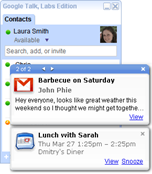
Google Talk Lab edition have released there new desktop version of Google Talk with same great features like that of the Google Talk Gadget including instant messaging, emoticons, and group chat.
image 
With this lab edition desktop notifications from Google Calendar,Orkut and Gmail are made available.But the Mac and Linux users will have have to wait for this release as it only supports windows PC for now.

The integration of Google calendar makes you to keep reminded of your upcoming appointments without opening your Google Calendar.
But if are a regular Google Talk user then please wait before installing this labs edition since it misses some important features like voice calling and file transfer.

Friday, December 17, 2010

iPad alternatives

The Apple iPad is widely accepted as the first successful tablet computer. It has sold 7.5 million as of 30 September 2010 according to Wikipedia. This figure is well above any of it's competitors. The iPad built upon the success of the iPhone and uses the same iOS operating system. It is only recently that there has been any real threat to the iPad's dominance and the release of the iPad 2 may seal the iPad's dominance in the tablet computer market.


But are there any real alternatives?

1. Samsung Galaxy Tab
This 7 inch Android powered tablet is currently the iPad's strongest competitor. It has many of the same features as the iPad and is around the same price. It's a well designed, professionally built tablet featuring, Wifi, 3G connectivity and a very responsive touchscreen. However it is powered by Android, an operating system created for much smaller devices. It also has very few apps that run on it as many Android developers have not embraced it. Although it is better than the iPad in some ways (it's smaller and lighter and has a micro SD card slot) it hasn't seen anything like the success of the iPad.


2. RIM BlackBerry PlayBook
Research in Motion (RIM) are a company which has seen little success in the touchscreen phone market. They seem very attached to the physical qwerty keyboard when all other manufacturers are moving to newer technology. Despite this fact they have decided to produce a touchscreen tablet known as the BlackBerry PlayBook. The PlayBook have joined Samsung in creating a 7 inch tablet which is also significantly smaller and lighter than the iPad. The PlayBook has front and rear facing cameras, a big advantage over Apple; on the other hand it will not feature 3G connectivity. The PlayBook is due to be shipped in early 2011.


3. Motorola Honeycomb Tablet
This tablet, which will be powered by the forthcoming , Android Honeycomb has just been announced. The name of this this tablet has not been announced by there are 3 possibilites: Stingray, Everest or Trygon. The hardware on this tablet will include a decent 32GB of flash memory and  1GHz Tegra 2 T20 processor. This is a real iPad competitor as it will be the first tablet to use a version of Android created specifically for tablet computer.s
 HP Slate.

There are other tablets on the market but they simply aren't up to the standard of these tablets. While the Galaxy Tab is a great product, it is ahead of Google and the operating system it's using just isnt suited to the larger screen size. The release of the PlayBook and the Android Honeycomb next year will cause some major shifts in the Tablet computing market.